Award-winning resources for history teachers and students aged 11-18.
ActiveHistory provides interactive simulations, self-marking quizzes,
lesson plans, worksheets and multimedia activities designed by
full-time history teacher Russel Tarr.
Trusted by history teachers worldwide for engaging, curriculum-focused resources.
World History teaching resources for the high school classroom: lesson plans, worksheets, quizzes and simulation games for KS3, IGCSE, IB and A-Level teachers.
Google Earth is a fantastic tool which allows you to explore the globe from your home computer. You can whizz around the planet; zoom in and out of countries, towns and even streets; examine the terrain, add your own overlay maps and construct virtual "flyover" tours of selected locations.
Google Earth has obvious applications in the Geography classroom, but it also has incredible potential for Historians.
1. Three ways that Google Earth can enhance history
All of the following, along with dozens of other examples, can be downloaded directly from https://www.activehistory.co.uk/google-earth (currently containing 124 resources, many more to follow this week!)
a. Terrain / Overlays
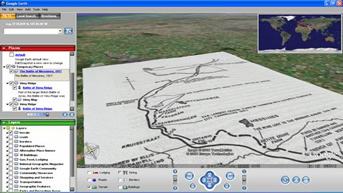
"Overlays" are maps which are scanned from a computer (or taken direct from the web) and then dropped over a historical site to give a much better sense of "place"; in addition, they can appear to physically "lie" over the landscape they describe, which is fantastic for sites where terrain made a difference (e.g. Vimy Ridge).
▪ London after the Great Fire
▪ Auschwitz
▪ Vimy Ridge
b. 3d Models
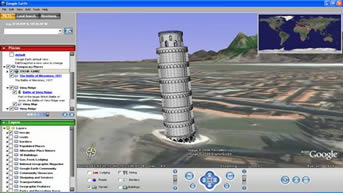
A number of users have designed their own 3D models which you can "whizz" around from various angles. So far they are quite gimmicky, but they show what the software is capable of.
▪ Taj Mahal
▪ Leaning Tower of Pisa
▪ Great Pyramid of Giza
c. Tours
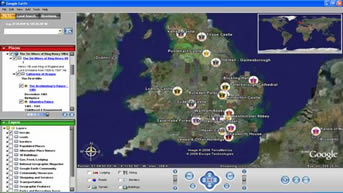
Flyovers are fantastic - a series of placemarks which can be arranged chronologically or thematically and then Google Earth "flies" from one spot to another. The first two examples here are good illustrations of the chronological approach; the third is a thematically-based one which could easily be adapted to other subjects.
▪ Assassination of JFK
▪ 1066: Year of 3 Kings
▪ Six Wives of Henry VIII
2. Obtaining existing resources - weblinks
In the first instance, it is a good idea to locate some resources to play around with that have been created already. The two sites I am using to build up my own searchable database are:
▪ Sketchup: 3D Model Creator
This freeware application allows you to create 3D models for Google Earth. http://sketchup.google.com/
▪ Tagzania: Networked placemarks
Sign up to this website to create collaborative tours with your students. http://www.tagzania.com/
▪ FlickrMap: Geotagged photographs
GeoTag your photos so that they appear as placemarks in Google Earth. http://www.flickrmap.com/
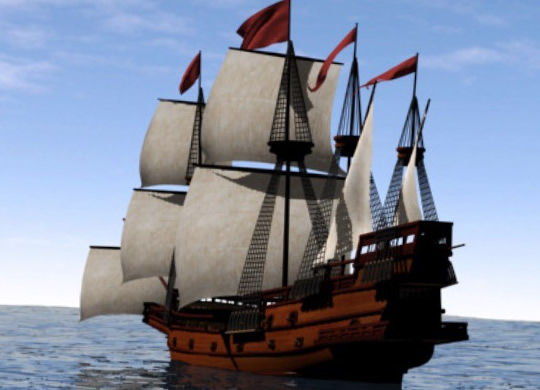
4. A Classroom Case Study: Circumnavigation of Francis Drake
▪ Available from ActiveHistory here.
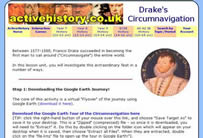
This is my first attempt at a Google Earth "Flyover". It comes complete with 6 differentiated worksheets and 32 locations to visit, and gives some idea of how the application can be used in the classroom.
TIP: The final worksheet in the series contains a Google Earth Helpsheet with advice on how to add placemarks and create "flyover" tours!
5. The ActiveHistory Google Earth Database
200 or so resources, fully searchable by year group, topic and resource type: click here!
Practical classroom strategies, revision guides and history publications by Russel Tarr.
About
ActiveHistory is the work of full-time history teacher Russel Tarr .
Latest news from my classroom
Get full access now!
ActiveHistory provides vast amounts of worksheets, lesson plans, interactive simulations, self-marking quizzes, model essays and teacher support materials for the high school world history classroom.
Whole-school, 24-hour access for students and teachers costs less than a few textbooks!
Why is the Church of England arguing about its links to slavery?
18th and 19th Centuries · Slavery and the British Empire · The Guardian
The Church of England is facing growing opposition to a plan to create a fund worth £100 million to address its historical links to the transatlantic slave trade. Research found that an older church investment fund, created in 1704, invested money in the South Sea Company. That company helped transport about 34,000 enslaved Africans across the Atlantic. The church also received donations from people connected to the slave trade, including Edward Colston, whose statue was thrown into Bristol harbour during a protest in 2020. Church leaders say the new fund should support communities affected by slavery and help repair some of the damage caused by the church’s past actions. Critics argue that the plan is legally uncertain and that the money should be spent in other ways. The disagreement shows how evidence about the past can lead to arguments about responsibility in the present.
Why it matters: The story connects the history of the British Empire and transatlantic slavery with a modern debate about responsibility. It shows that historical research can affect powerful organisations today. It also raises a difficult question: if an institution benefited from injustice in the past, what should it do now?
Classroom question: “What should an organisation do when its past includes profiting from slavery?”
What can photographs from 1976 tell us about America?
20th Century · United States and Social Change · Smithsonian Magazine
A new exhibition at the Smithsonian American Art Museum brings together more than 200 photographs taken across the United States during the 1970s. The photographs were part of a project funded by the National Endowment for the Arts to mark America’s 200th birthday in 1976. Photographers recorded cities, rural communities, celebrations, workplaces, families and changing landscapes. Some images show ordinary daily life, while others capture major changes such as new transport systems, damaged towns and the effects of the eruption of Mount St Helens. The project involved 72 photography surveys and thousands of pictures, but it was later almost forgotten. The new exhibition, called Much Here Is Beautiful, presents the photographs as a record of what the United States looked like during a period of change. It also shows that history is not only made from famous leaders and major battles. Everyday people and places can provide important evidence too.
Why it matters: Photographs can act as evidence of social change. They show clothing, buildings, technology, work and family life in ways that written sources may not. These images also remind us that national history is made from many local stories, not only the events that appear in textbooks.
Classroom question: “What can an ordinary photograph tell us about life in the past?”
Could this Roman fort prove an old Welsh story was true?
Ancient History · Roman Britain · The Guardian
Archaeologists have found the remains of a large Roman fort in Pembrokeshire, Wales. The fort was probably built in the fourth century, when Magnus Maximus was a Roman emperor who ruled Britain. Medieval Welsh storytellers later included him in a famous tale called The Dream of Macsen Wledig, which said that he camped near Frenni Fawr in the Preseli Hills. For a long time, there was no physical evidence that the story was based on a real place. That has now changed. Researchers have found Roman coins, roof tiles, pottery, an iron writing tool and the remains of important buildings. The fort may have held about 500 soldiers. Its position also suggests that the Romans were keeping a close watch on local people, rather than living peacefully beside them. The discovery does not prove every part of the medieval story, but it shows how old legends can sometimes preserve clues about real events.
Why it matters: This discovery connects Roman invasion, local resistance and medieval storytelling. It also shows how historians test stories against physical evidence. A tale that sounded like a legend for hundreds of years may contain a memory of a real Roman army camp.
Classroom question: “What evidence suggests the Welsh story may be based on real events?”
Why are people arguing about what should happen to Ukraine’s revealed landscape?
Contemporary History · Ukraine, War and Heritage · The Guardian
When the Nova Kakhovka dam in southern Ukraine was destroyed in June 2023, a huge reservoir drained away. The disaster flooded towns and caused many deaths, but it also revealed a landscape that had been hidden underwater since the 1950s. Archaeologists working near Khortytsia Island have found traces of thousands of years of human life, including Bronze Age objects, Scythian pottery, a Byzantine storage jar, old anchors and a wooden boat made from one tree trunk. The area was also important to the Zaporizhzhian Cossacks, a powerful Ukrainian community that developed there from the sixteenth century. Ukrainian historians and environmental groups want the exposed land protected as a world heritage site. Other people argue that the dam and reservoir should be rebuilt to support farming and electricity production after the war. The debate is about more than archaeology. It is also about nature, national history and the future of Ukraine.
Why it matters: The destroyed dam has uncovered evidence from many different periods, from prehistory to the Cossacks. The argument over rebuilding it shows how modern decisions can affect historic landscapes and how the past can become part of a country’s struggle over its future.
Classroom question: “Should Ukraine rebuild the dam or protect the historic landscape now revealed?”
Why are Russian attacks on Ukraine’s power stations so important?
Contemporary History · Russia and Ukraine · The Guardian
Russia has attacked several power plants in Ukraine, even as the United States claimed that Russia and Ukraine had agreed to stop attacking energy sites. Ukrainian president Volodymyr Zelenskyy said Russian drones had struck power facilities in Kyiv and Kharkiv. Six people were reported killed in attacks across the country. Power stations are important military targets because electricity is needed for homes, hospitals, transport, factories and communications. Attacking them can make life harder for civilians and weaken a country’s ability to continue fighting. The attacks are part of a wider war that began with Russia’s full-scale invasion of Ukraine in February 2022. Ukraine’s leaders say they are seeking clear agreements, but Russia had not confirmed the energy ceasefire claim when the report was published.
Why it matters: Wars are fought not only by soldiers on battlefields. Electricity, railways, factories, food supplies and communications can all become targets. This story helps explain how modern warfare affects ordinary people and why controlling energy has become an important part of international politics and military strategy.
Classroom question: “Why might an army attack power stations instead of only military bases?”
What can a tiny ring tell us about the lost Lighthouse of Alexandria?
Ancient History · Ancient Egypt and Greece · Smithsonian Magazine
Underwater archaeologists working near Alexandria in Egypt have found a bronze signet ring showing the famous Lighthouse of Alexandria. The lighthouse was built more than 2,000 years ago during the rule of the Ptolemies, a Greek-speaking dynasty that ruled Egypt after the death of Alexander the Great. It may have stood between 330 and 430 feet tall and guided ships into the city’s harbour. Earthquakes eventually destroyed it, and much of the building now lies underwater. The newly found ring is the first known example of jewellery showing the lighthouse. It was discovered near the remains of a palace where rulers and powerful figures once lived. The ring may help researchers understand how the lighthouse looked and who worked in the centre of power around it.
Why it matters: The Lighthouse of Alexandria was one of the Seven Wonders of the Ancient World, but almost all of it has disappeared. A small object can still provide important evidence about a huge building and the people connected to it. The discovery also shows how Egypt combined Greek, Egyptian and wider Mediterranean cultures.
Classroom question: “How can one small object help historians understand a huge building?”
Did Elizabeth I really write her angry letters herself?
16th Century · Tudor England · Smithsonian Magazine
New research suggests that some of Elizabeth I’s most famous letters were edited by the men who worked for her. Historians examined more than 500 letters from the Tudor queen, including messages about Mary, Queen of Scots, and James VI of Scotland. Around 3,000 letters written during Elizabeth’s reign still survive, but most were written down by secretaries rather than by the queen herself. One secretary, Francis Walsingham, appears to have made some letters sound even angrier or friendlier than Elizabeth’s first drafts. This may have been deliberate. Strong language could frighten an opponent, while warmer language could persuade someone to cooperate. The research does not prove that Elizabeth had no control over the letters. Instead, it suggests that royal messages were often teamwork, with secretaries helping shape the queen’s public voice.
Why it matters: Letters can look like direct evidence of what a famous person thought, but they may have been copied, edited or shaped by other people. This changes how we view Elizabeth I, who has often been described as naturally fierce or hot-tempered. Her letters may show careful political planning rather than simple emotion. The story is a reminder to ask who created a historical source and why.
Classroom question: “How can secretaries change what we think a ruler really believed?”
Why do horror films tell us what people were afraid of?
20th and 21st Century · Social and Cultural Change · Smithsonian Magazine
A new exhibition in Los Angeles is bringing together nearly 350 objects from the history of horror films. Visitors can see costumes, posters, props and books connected to films such as Dracula, Frankenstein, Psycho, The Shining and Scream. The exhibition also looks at how horror has changed over time. Early films often reflected fears about war, science, immigration and powerful leaders. Later films explored worries about consumer culture, racism, changing ideas about women and pressure to look a certain way. The 1920 German film The Cabinet of Dr. Caligari, for example, appeared after the First World War and showed a frightening world controlled by an authoritarian figure. The exhibition’s organisers argue that horror films act like a mirror. The monsters may be imaginary, but the fears behind them often come from real historical events and social changes.
Why it matters: Popular culture can be historical evidence. Horror films reveal what different generations feared, including war, dictatorship, new technology, racism and social change. A monster is rarely just a monster. It may represent worries about outsiders, unfair power or a rapidly changing society. Looking at films this way helps explain why some stories remain popular while others disappear.
Classroom question: “What fears can horror films reveal about the time they were made?”
Could this new study change what we know about the first Americans?
Prehistory · Human Migration · National Geographic
Scientists are debating the age of Monte Verde, an important archaeological site in southern Chile. When the site was studied in the 1970s, researchers found stone tools, wooden objects, animal remains and a human footprint. They concluded that people had lived there about 14,500 years ago. This was surprising because many historians and archaeologists had believed that the Clovis people of North America were the earliest known inhabitants of the Americas. A new study argues that some of the old wood used to date Monte Verde may have been much older than the human settlement. Rivers could have carried ancient wood into the area, making the campsite seem older than it really was. The new researchers suggest that the site may be less than 8,000 years old. Some of the original archaeologists strongly disagree. The argument matters because the date of Monte Verde affects ideas about when people reached the Americas and whether some groups travelled along the Pacific coast by boat.
Why it matters: This story shows that historical knowledge can change when people examine old evidence in a new way. Dating evidence is not always simple, especially when objects have moved through rivers or layers of soil. The debate also connects with bigger questions about migration, travel and how humans spread across the world.
Classroom question: “Why can dating an archaeological site be so difficult?”
Scientists have found ancient human DNA in samples taken from prehistoric cave walls in Spain and Portugal. The DNA came from places connected with rock art, including a red painted dot in Escoural Cave in Portugal. Researchers do not yet know whether the DNA belonged to the person who made the painting. It might have come from an artist, someone who helped them or a later visitor who touched the wall. The team collected tiny samples from cave walls and paintings while wearing protective clothing and using sterile tools. The discovery is important because prehistoric artists usually left no written names or clear personal clues. DNA could provide information about the people who visited caves thousands of years ago. It may eventually help researchers study their sex, ancestry or relationships with other groups. However, scientists warn that DNA can be moved by water, animals or later visitors, so the results must be examined carefully.
Why it matters: Prehistoric paintings are some of the oldest evidence of human imagination, but we rarely know who created them. Ancient DNA could add a personal story to pictures of animals, hands and symbols. At the same time, the discovery reminds us that evidence can be exciting without giving a simple answer.
Classroom question: “What could DNA tell us about people who visited prehistoric caves?”
How did Margaret Hamilton help Apollo 11 reach the Moon?
20th Century · Cold War and Space Race · Smithsonian Magazine
Margaret Hamilton, the computer scientist whose software helped guide Apollo 11 to the Moon, has died aged 90. In the 1960s, she led the team that wrote the computer programs for NASA’s Apollo missions. Computers were much less powerful than they are today, so the software had to be carefully designed to deal with problems during flight. During the Apollo 11 landing in July 1969, the spacecraft’s computer became overloaded with information. Hamilton’s software was able to keep the most important tasks running, helping the astronauts continue their descent. Hamilton later helped make the term “software engineering” widely known. At the time, some people treated software as less important than the physical machinery of a spacecraft. Her work showed that computer instructions could be just as vital as engines, rockets and metal equipment.
Why it matters: The Moon landing is often remembered through photographs of astronauts and rockets, but it also depended on invisible work done by programmers. Hamilton’s story shows how technology changed during the Cold War and how women made important contributions to science even when they did not always receive equal recognition.
Classroom question: “Why was computer software as important as rockets during the Moon landing?”
Why was a huge Salvador Dalí book cover stolen from a French museum?
20th Century · Art and Heritage · Smithsonian Magazine
Thieves have stolen a bronze book cover designed by the artist Salvador Dalí from a small museum in central France. The cover weighs about 330 pounds, or 150 kilograms, and is covered with unusual materials including bronze, gems, pearls, forks and seashells. It was made for Livre de l’Apocalypse, a huge illustrated book created between 1958 and 1961 by a group of artists and writers. The book was inspired by the biblical Book of Revelation. It travelled to nearly 150 exhibitions around the world, including the 1964 World’s Fair in New York. The thieves broke through the museum’s gate and smashed the display case, but left the book’s pages and other pieces behind. Police are investigating how anyone managed to remove such a heavy object. The stolen cover is valuable, but its historical and artistic importance may make it impossible to replace.
Why it matters: Museums protect objects that tell stories about religion, art, technology and society. This theft shows that cultural heritage is not always an ancient statue or medieval manuscript. A modern artwork can also become part of history, especially when it records the ideas and styles of its own time.
Classroom question: “Why can a modern artwork become an important piece of history?”
Why are people still arguing about the Parthenon sculptures?
Ancient History and Contemporary History · Ancient Greece and Museums · The Guardian
Greece’s prime minister has promised to increase efforts to bring the Parthenon sculptures back from the British Museum. The sculptures were made in ancient Athens in the fifth century BC, when the Parthenon was built as a temple to the goddess Athena. More than 200 years ago, Lord Elgin, Britain’s ambassador to the Ottoman Empire, arranged for many of the sculptures to be removed and taken to Britain. The British Museum bought them in 1816. Greece says the sculptures were taken unfairly and should be reunited with the parts that remain in Athens. The museum argues that it legally owns them and that keeping them in London allows people from around the world to see them. Talks about a possible agreement have made little progress. The argument is part of a wider debate about empire, ownership and whether museums should return objects taken from other countries.
Why it matters: The disagreement is not only about ancient marble. It is also about the history of the British Empire and who has the right to control another country’s cultural heritage. The sculptures were designed as one connected work, so their separation raises a simple but difficult question: is it more important to protect a museum’s collection or reunite an object with its original home?
Classroom question: “Should the Parthenon sculptures be returned to Greece?”
What can a lost film tell us about how people remember Hastings?
Medieval History and 20th Century History · Norman Conquest · The Guardian
English Heritage has found rare colour film showing the first large re-enactment of the Battle of Hastings. The event took place in 1966, 900 years after William the Conqueror defeated Harold Godwinson in 1066. Around 500 university students dressed as Normans and English soldiers and fought with wooden weapons on the original battlefield near Battle in East Sussex. The re-enactment was not very accurate. Some costumes were made from sacks, the weapons were painted wood and the two sides apparently became involved in real pushing and shoving. About 30,000 people watched. The film was made by local electronics expert Alan Wootton and was recently rediscovered by his son, who had helped on the day as a child. English Heritage has turned hundreds of reels into a short film. The modern re-enactment still takes place every year, but with much stricter safety rules.
Why it matters: The film shows that people do not simply remember history by reading books. They also act it out, celebrate it and sometimes turn it into a story about national pride. The contrast between the 1966 event and modern re-enactments raises questions about accuracy, entertainment and how people imagine the Norman Conquest.
Classroom question: “How different should a historical re-enactment be from the real event?”
Could reading the Voynich manuscript in a new order solve its mystery?
Medieval History · Medieval Europe · The Guardian
The Voynich manuscript is one of history’s strangest books. Made from parchment in the early 1400s, it contains drawings of plants, stars, pipes and people, alongside writing that nobody has been able to read. Some people have called it a secret code, a lost language, a medical guide or even a clever hoax. New research suggests that the problem may partly be the way the pages were put together. Researchers Colin Layfield and Lisa Fagin Davis think the pages may originally have been separate sheets stacked like small booklets. Later, someone may have bound them in the wrong order. This does not reveal what the writing means, but it may change how the book was used. Evidence also suggests that up to five different writers worked on it, making it more likely to have been a shared collection of knowledge rather than the work of one mysterious genius.
Why it matters: The Voynich manuscript shows how difficult it can be to understand the past when evidence is incomplete. A small mistake in the way pages were arranged may have confused readers for centuries. It also reminds us that historical objects were often created by groups of people, not just famous individuals.
Classroom question: “What might the manuscript’s pages tell us about medieval knowledge?”
What can Roman writing tablets tell us about life in London?
Ancient History · Roman Empire · London Museum
A new exhibition about Roman London will open inside a network of underground vaults beneath Smithfield Market. The vaults were rediscovered in 2019 when builders broke through a wall during work on the new London Museum. The exhibition will display objects from the Bloomberg Collection, a group of more than 14,000 artefacts found during excavations in the City of London. These include wax writing tablets, a baby’s feeding bottle, a coin from the reign of Emperor Nero and cockroach eggs found inside a Roman bakery oven. Together, the objects offer clues about ordinary people who lived in Londinium during its first decades. London began as a frontier settlement after the Roman invasion of Britain and gradually became a busy town connected to the wider empire. The exhibition is due to open in spring 2027.
Why it matters: The objects reveal Roman history through everyday life rather than only emperors and battles. A writing tablet can show what people argued about, a feeding bottle can suggest how families cared for babies, and a coin can reveal how quickly London joined the Roman world.
Classroom question: “Why might everyday objects tell us more than statues of emperors?”
What happens when drought reveals ancient buildings beneath the water?
Ancient History · Ancient Civilisations and Climate Change · National Geographic
Falling water levels in Turkish lakes and reservoirs are revealing buildings and landscapes that have been hidden for years. At Lake İznik, the remains of a large basilica have emerged from the water. Some archaeologists think it may be connected with the Council of Nicaea, an important Christian meeting held in AD 325. Other drying lakes have revealed an Iron Age settlement, medieval castle remains, Ottoman wooden structures and prehistoric rock art. The discoveries are exciting, but the dry conditions can also damage them. Wooden buildings and other materials survived underwater because they were protected from oxygen and sunlight. Once exposed, they can crack, rot or become easier for looters to reach. The changes are linked to drought, falling water levels and climate change. Researchers are recording and protecting the remains before the water rises again or the sites deteriorate.
Why it matters: The story connects ancient history with a problem happening today. Climate change is not only changing landscapes and water supplies. It is also uncovering some parts of the past while putting them at risk. It shows that historical evidence can be lost through natural change just as easily as through war, building work or looting.
Classroom question: “Why did some ancient buildings survive underwater but face danger when exposed?”
Why are a museum and an Indigenous people bringing ancestors home?
19th and 20th Centuries · Colonialism and Museums · The Guardian
The Pitt Rivers Museum in Oxford has agreed to return 39 pieces of human remains belonging to Naga communities in north-east India. The remains include parts of skulls, a finger and skin with hair. They were collected by British colonial administrators and kept in the museum for nearly a century. Naga representatives say the remains should never have been treated as museum objects and that their return is about memory, respect and giving ancestors a proper resting place. The negotiations began in 2020 and involved representatives from different Naga tribes, community groups and museum staff. The museum has also reviewed its wider collection of more than 6,500 Naga objects, many of which were collected during British rule. A handover ceremony is expected in Oxford before the remains are taken to Nagaland for a traditional ceremony.
Why it matters: Colonialism changed not only who controlled land and governments, but also what happened to people's bodies, objects and traditions. This story shows how communities are challenging the way museums collected and displayed material from colonised peoples. Returning the remains is an attempt to repair some of that harm and give families control over their own history.
Classroom question: “Why do the Naga communities believe the remains should be returned?”
Were servants sacrificed when ancient Egyptian kings died?
Ancient History · Ancient Egypt · The Guardian
A new study has reopened a disturbing question about the first kings of Egypt. At Umm el-Qa’ab, a royal cemetery near Abydos, hundreds of people were buried close to the tombs of rulers from around 3000 BC. These people may have been court officials, craftspeople and servants who were expected to continue serving the king in the afterlife. For more than a century, historians have argued about whether they were killed or died naturally before being buried. Researchers have now examined the skulls of 46 people from the cemetery. Eighteen showed signs of serious injuries, including fractures that may have happened shortly before death. One skull had an injury near the eye. The evidence suggests that at least some of the people may have been violently killed, although the researchers warn that the sample is small and cannot answer every question. The practice appears to have ended early in Egyptian history, when statues began to replace living servants in royal burials.
Why it matters: This discovery shows how new scientific methods can change ideas that historians have debated for generations. It also gives a more complicated picture of ancient Egypt. Royal tombs were not only about impressive buildings and famous pharaohs. They may also reveal the fear, power and violence experienced by ordinary people who lived under a king.
Classroom question: “What can these injuries tell us about royal power in ancient Egypt?”
Why are Greece and Bulgaria returning historic treasures to each other?
Medieval History · Museums and Heritage · The Guardian
Greece and Bulgaria have completed an unusual exchange of historic objects and human remains after decades of discussion. Greece is returning the remains believed to belong to Tsar Samuel, a medieval Bulgarian ruler who fought to protect his kingdom from the Byzantine Empire. Bulgaria is returning 48 religious objects, including icons, crosses and church vessels taken from Greek monasteries during the First World War. The ceremony has also revived the argument over the Parthenon sculptures, which were removed from Athens in the early 1800s and are now displayed in the British Museum. Greece’s prime minister said the agreement showed that countries can solve difficult arguments about cultural heritage when they have enough political will. The story raises a simple but difficult question: should historic objects stay in the museums that have held them for many years, or should they return to the places and communities where they were originally created?
Why it matters: The objects in museums often have complicated journeys. Some were bought legally, while others were taken during wars, imperial rule or unequal negotiations. Returning them can help repair old relationships, but it can also change what visitors see in major museums. The debate shows that history is still connected to politics and national pride today.
Classroom question: “Should historic objects return to the countries where they were made?”
Why is a new film making France look again at Nazi collaboration?
20th Century · World War II and the Holocaust · The Guardian
A new French film called Notre Salut is attracting large audiences by showing how ordinary officials helped the Vichy regime during the Second World War. Vichy was the authoritarian government led by Marshal Philippe Pétain after France was defeated by Germany in 1940. It worked with the Nazis and helped send about 76,000 Jewish people from France to concentration camps. Instead of focusing only on famous leaders or resistance heroes, the film follows a minor administrator who deals with the paperwork and transport arrangements behind the deportations. The story was inspired by letters found by the director, Emmanuel Marre, which described the life of his great-grandfather, a Vichy official. The film has become popular while France is debating the growth of far-right politics. Many people are asking how ordinary citizens can become involved in an unfair or violent system without stopping to question what they are doing.
Why it matters: This story shows that dictatorships do not work only because of powerful leaders. They also depend on officials, workers and ordinary people who carry out orders. It raises an uncomfortable question about responsibility: if someone says they were only following instructions, does that excuse their actions? The film also shows why countries continue to argue about their wartime past.
Classroom question: “Why might ordinary officials help an unfair government?”
Why are Russian attacks destroying Ukrainian books?
Contemporary History · Russia and Ukraine · The Guardian
Russian attacks have destroyed millions of books in Ukraine, including children’s picture books, school textbooks and novels. In one strike on a publishing warehouse in Kharkiv, about eight million books were lost. The warehouse was not near a military base, although Ukrainian officials disagree about whether it was deliberately targeted because it contained Ukrainian-language books or was part of wider attacks on storage buildings. The destruction has serious effects because publishers now have fewer books to sell during the school year. The attacks also connect to a much longer history. Under the Russian tsars, publishing in Ukrainian was restricted, and during the Soviet period Russian was often treated as the language of education and culture. Since Ukraine became independent in 1991, Ukrainian publishers have worked to build a stronger national literature. For many Ukrainians, protecting books means protecting their language, culture and right to decide who they are.
Why it matters: Wars are not only fought with soldiers and weapons. They can also target language, schools, libraries and memories. Destroying books may make it harder for people to learn about their own culture and history. This story shows why language matters so much to national identity, especially for a country that has spent centuries under pressure from a more powerful neighbour.
Classroom question: “Why might a government try to control another country’s language?”
What can ancient chocolate tell us about connections in the Americas?
Ancient History · Indigenous Peoples and Trade · Smithsonian Magazine
Scientists have found the earliest known traces of cacao east of the Mississippi River. They discovered signs of cacao DNA on pottery fragments from Etowah in present-day Georgia. The pottery was made about 1,000 years ago by people of the Mississippian culture, who built large earthen mounds. Cacao grows naturally in tropical parts of Central and South America, so it could not have grown near Etowah. This suggests that beans, recipes or ideas travelled over long distances through trade and personal connections. People in the region probably drank a bitter chocolate drink during a feast linked to the building of a mound. Researchers had to test the pottery carefully to make sure the DNA was ancient and had not come from modern contamination. The discovery challenges the idea that Indigenous societies in North America were isolated from one another.
Why it matters: The story shows that people in the ancient Americas travelled, traded and shared ideas across huge distances long before European arrival. It also reminds us that history can be hidden in unexpected places. Tiny traces left inside broken pots can reveal connections between communities that lived 1,000 years ago.
Classroom question: “How could cacao have travelled from Central America to Georgia?”
Why did one soldier fight in three different revolutions?
18th Century · Age of Revolutions · Smithsonian Magazine
Louis-Marie, Viscount de Noailles, was a French soldier who fought in the American, French and Haitian Revolutions. As a young aristocrat, he joined the American fight against Britain and became a friend of George Washington, Alexander Hamilton and the Marquis de Lafayette. During the French Revolution, he helped persuade nobles to give up their special legal privileges. But later he led French troops against formerly enslaved people who had revolted in the French colony of Saint-Domingue. The rebels won and created Haiti, the first Black republic, in 1804. Noailles's life shows a major contradiction in the Age of Revolutions. Many European revolutionaries spoke about liberty and equality, but they did not always support freedom for enslaved people. At the time, some leaders mainly meant freedom from kings and aristocrats. The Haitian Revolution pushed the idea of human freedom much further.
Why it matters: Revolutions are often described as fights for freedom, but freedom was not always meant for everyone. Noailles's career shows how the same person could support independence in one place and help suppress a rebellion in another. The Haitian Revolution forced the world to ask who should count as free.
Classroom question: “Why did ideas about freedom mean different things to different people?”
Why has a German town stopped new memorials for Nazi victims?
20th Century · Nazi Germany and the Holocaust · The Guardian
A town in Germany has voted to stop the installation of new Stolpersteine, or stumbling stones, which remember people persecuted and murdered by the Nazis. These small brass plaques are placed in pavements outside the homes or workplaces of victims. Each one gives a name and brief details about what happened to that person. More than 128,000 Stolpersteine have been installed across Europe, making the project one of the world's largest grassroots memorial schemes. In Heidenau, councillors from the far-right Alternative for Germany party joined members of the conservative Christian Democratic Union to approve the halt. Supporters say the plaques are walked on and should be replaced by one larger memorial. Opponents argue that the stones make victims part of everyday life and help people remember that they were neighbours, workers and families. A legal challenge is now being planned.
Why it matters: The debate shows that remembering the past can become a political argument. The Holocaust happened more than 80 years ago, but people still disagree about how it should be remembered. The Stolpersteine also make history personal by linking huge events such as Nazi persecution to ordinary homes and individual lives.
Classroom question: “Should memorials remember individual victims or focus on the whole event?”
What did Britain know about the Holocaust during World War Two?
20th Century · World War Two and the Holocaust · The Guardian
A new exhibition is examining how much Britain knew about the Holocaust while it was happening. Many people believe that the British public only learned about the Nazi murder of Europe's Jews after the war. However, newspapers, radio broadcasts, government reports and witnesses were already describing mass killings during the early 1940s. The Manchester Guardian reported especially strongly on the persecution of Jewish people and argued that Britain and other countries should do more to help refugees. Information was often smuggled out of occupied Poland by couriers working for the Polish government-in-exile in London. At the same time, Britain had strict immigration rules and some people opposed allowing more Jewish refugees into the country. The exhibition will travel to different parts of the United Kingdom while plans continue for a permanent Holocaust Memorial and Learning Centre in London.
Why it matters: This story raises a difficult question about what people do when they receive shocking information. Knowing about a crime does not automatically lead to action. The history also shows that governments and ordinary people can respond in different ways, with some offering help while others fear refugees or refuse to change their policies.
Classroom question: “Why might governments know about a terrible event but still act slowly?”
How are Lenape people bringing their language and culture back?
19th Century and Contemporary History · Indigenous Peoples and Colonialism · The Guardian
A new exhibition in New York is telling the story of the Lenape, the Indigenous people whose homeland included Manhattan. During the 19th century, the United States forced many Indigenous children into boarding schools. They were separated from their families, given new names and punished for speaking their own languages. The aim was to make them abandon their cultures. One object in the exhibition is a 150-year-old hymnal written partly in Munsee, a Lenape language. Missionaries originally used it to teach Christian songs, but Lenape people are now using it to recover old words and grammar. The exhibition also includes clothing, music, paintings and modern protest art. The Lenape were badly affected by disease, violence and forced removal, but their story did not end. Today, communities in the United States and Canada are working to protect their language, land and traditions.
Why it matters: This story shows that colonialism did not only take land. It also attacked languages, names and traditions. It is surprising that a book once used to erase Lenape culture is now helping to rebuild it. The exhibition also challenges the idea that Indigenous peoples belong only to the past. Lenape communities are still active and are shaping their own future.
Classroom question: “Why was keeping the Lenape language so important?”
What can old records tell us about people who lived under slavery?
19th Century · Slavery and the British Empire · The Guardian
Nearly four million records about enslaved people in 20 former British colonies can now be searched online. The collection contains about 300,000 pages created between 1813 and 1840. The records include names, ages, family connections, births, deaths and transfers between owners. They were originally made by the British government to monitor enslaved people and stop illegal trading after the transatlantic slave trade was abolished in 1807. Today, descendants are using them for a very different purpose: finding their ancestors and rebuilding family histories. Researchers have already traced some families across six generations. The records cover places including Jamaica, Barbados, the Bahamas, Trinidad, Mauritius and South Africa. They cannot show everything about a person’s life, because they were created by a system that treated human beings as property. However, they can reveal names, relationships and stories that might otherwise have disappeared.
Why it matters: Many accounts of slavery focus on governments, ships, plantations and slave owners. These records help bring attention back to the people who were enslaved. A name, an age or the name of a child can make the past feel more personal. The collection also shows that slavery still affects families and communities today.
Classroom question: “How can a person’s name change the way we understand slavery?”
What can a Sami writer from 1910 tell us about life today?
20th Century · Indigenous Peoples and Land Rights · The Guardian
A new exhibition in Kiruna, northern Sweden, is showing the work of Johan Turi, a Sami writer and artist who lived around the beginning of the twentieth century. Turi was one of the first Sami people to write about Sami life in his own language. His drawings and writing describe reindeer herding, beliefs, family life and the pressure placed on Sami communities by settlers, railways, mining and national borders. The exhibition has opened as Sweden prepares to receive a report about the mistreatment of Sami people by the state. The Sami are the Indigenous people of northern Norway, Sweden, Finland and part of Russia. Many still face disputes over land because mining, wind farms and other industries can damage the areas needed for reindeer herding. Turi hoped that telling his own story would make powerful people understand Sami lives. More than a century later, his work is still part of that struggle.
Why it matters: This story shows why people want to tell their own history instead of allowing outsiders to speak for them. Turi's work is both a record of everyday life and a protest against unfair treatment. It also shows that problems involving land, language and discrimination can continue for generations.
Classroom question: “Why did Johan Turi want Sami people to tell their own history?”
How did Britain’s empire change the lives of Kenyan tea workers?
20th Century · Colonialism · The Guardian
A new documentary about Kenya's tea plantations has brought attention to the history behind a drink enjoyed around the world. The film focuses on the Kikuyu people, whose farming traditions go back centuries. During British colonial rule, many Kikuyu people were forced off their ancestral land while their labour helped make plantations profitable. The documentary follows workers, activists and families who are still seeking justice and the return of land. It also explores how some of the inequalities created during colonial rule have continued under modern companies and governments. One of the film-makers discovers that her own grandfather was involved in colonial abuse, making the story personal as well as political. Kenya became independent in 1963, but independence did not automatically solve every problem created by colonialism. The film asks viewers to think about how products bought in other countries can be connected to histories of land seizure, forced labour and resistance.
Why it matters: Tea can seem like an ordinary part of daily life, but its history can involve empire, land loss and exploitation. This story connects the British Empire to the experiences of real families in Kenya. It also shows that independence may end colonial rule without immediately removing every unfair system left behind.
Classroom question: “Why did land become such an important issue in colonial Kenya?”
Why are people arguing about who really fought in World War Two?
20th Century · World War Two and China · Reuters via Internazionale
Taiwan has challenged the way China is presenting the history of World War Two after Chinese President Xi Jinping and US President Donald Trump praised the wartime alliance between China and the United States. Beijing presents Chinese Communist forces as the main force resisting Japan, while Taiwan argues that the Republic of China government was the recognised Allied government in China and carried much of the fighting. The dispute is connected to the Chinese Civil War, which ended in 1949 when Mao Zedong’s Communists took control of mainland China and the Republic of China government moved to Taiwan. Taiwan fears that a version of wartime history led by Beijing could influence American policy towards the island. The argument shows how governments use memories of the past to support present-day political claims.
Why it matters: This is a clear example of history being used in modern international politics. It links World War Two to the Chinese Civil War, the creation of Communist China and the continuing dispute over Taiwan. Students can see that historical accounts are not always neutral, especially when governments use the past to justify power, territory or national identity.
Classroom question: “Why might governments want to control the story of World War Two?”
Why is the Smithsonian arguing about how American history should be told?
Contemporary History · Museums and American History · The Guardian
The Smithsonian’s outgoing secretary, Lonnie Bunch, has defended the institution after criticism from President Donald Trump and his administration. Speaking at the National Museum of African American History and Culture, Bunch rejected claims that the Smithsonian is unpatriotic because its museums discuss slavery, racism and other difficult parts of American history. He argued that the United States cannot be properly understood without examining both achievements and injustice. The dispute comes as the White House reviews Smithsonian museums before the 250th anniversary of American independence in 2026. Trump has called for more emphasis on national heroes and has criticised what he describes as negative interpretations of the country’s past. The argument raises a central historical question: should museums mainly celebrate a nation, or should they present its successes and its wrongdoing together?
Why it matters: This story connects directly to slavery, the Civil Rights Movement and the question of who controls national history. It is useful for teaching historical interpretation because students can compare different ideas about patriotism, evidence and museum displays. It also shows that debates about the past can become political arguments in the present.
Classroom question: “Should a museum show a country’s achievements and wrongdoings together?”
Why has an old Northern Irish marching route caused new protests?
Contemporary History · Northern Ireland and the Troubles · The Guardian
A Protestant Orange Order parade has taken place along Garvaghy Road in Portadown, Northern Ireland, after almost 30 years of restrictions. The road runs through a mainly Catholic area, and many residents opposed the march because similar processions became flashpoints during the Troubles. Courts allowed a smaller parade to go ahead, but hundreds of protesters gathered, linking arms to block the route. The dispute is connected to the long conflict between unionists, who generally support Northern Ireland remaining part of the United Kingdom, and nationalists, who generally favour a united Ireland. The original Drumcree dispute helped create serious disorder before the route was banned in 1998, the same year as the Good Friday Agreement. The new parade has not led to a return to the violence of the past, but it shows how historical arguments about identity, religion and territory can remain powerful decades after a peace agreement.
Why it matters: This is a vivid way into the Troubles, sectarian division and the Good Friday Agreement. Students can see that peace agreements may stop large-scale violence without removing every disagreement. The story also raises questions about public space, tradition, protest and whether groups should be allowed to repeat historic ceremonies when local residents see them as threatening.
Classroom question: “Why did this march make people feel unsafe?”
Why is Britain still arguing about the Chagos Islands?
Contemporary History · Colonialism and Decolonisation · The Guardian
The British government has put payments to Mauritius on hold while it reviews a deal over the Chagos Islands. The proposed agreement would transfer sovereignty of the islands to Mauritius, while allowing Britain and the United States to continue using the military base on Diego Garcia for 99 years. The deal has been delayed because US President Donald Trump does not support it in its present form. The argument has deep historical roots. In the 1960s, Britain separated the Chagos Islands from Mauritius shortly before Mauritius became independent. Chagossians were then removed from their homes to make way for the Diego Garcia base, and many have never been able to return. Britain now faces pressure over colonialism, the rights of displaced people and the strategic importance of the base. The latest disagreement shows how decisions made during decolonisation still affect international politics and real families today.
Why it matters: This story connects directly to the end of the British Empire, decolonisation and the Cold War. It helps students see that empire did not simply disappear when colonies became independent. Questions about military bases, forced removal, sovereignty and the rights of local people remain part of international relations.
Classroom question: “Who should decide what happens to the Chagos Islands?”
How did Denisovans survive in China thousands of years ago?
Prehistory · Human Evolution and Migration · National Geographic
Researchers studying Bianfu Cave in southwestern China have identified three Denisovan bones, four teeth and more than 1,300 stone tools. The finds include the first known Denisovan forearm bone and connect these ancient humans directly with tools and animal remains. The bones are between about 167,000 and 134,000 years old. The discovery suggests Denisovans lived much farther south than first thought and helps scientists understand how they hunted and used technology.
Why it matters: The story gives students a vivid example of how new evidence changes ideas about human evolution and migration. Denisovans were once known mainly from DNA and a single finger bone. These finds provide more direct evidence of their lives and show that the human past included several different human groups living across Asia.
Classroom question: “How can bones and tools show how ancient people lived?”
What can an untouched Chimú tomb tell us about an ancient empire?
Medieval History · Chimú Empire · National Geographic
Archaeologists working at Chan Chan in Peru have uncovered a largely untouched Chimú funerary platform containing 38 skeletons, weapons, ceramics, jewellery and objects made from shells and metal. The Chimú Empire ruled much of Peru’s northern coast before being conquered by the Inca in the fifteenth century. Because earlier tombs were heavily looted, this discovery gives researchers unusually detailed evidence about elite life, religion, warfare and social organisation.
Why it matters: The discovery introduces students to a major American civilisation that is often overshadowed by the Inca. It also shows why archaeologists need objects in their original positions. The tomb may help explain Chimú beliefs, social ranking and military power while improving understanding of the Inca conquest.
Classroom question: “Why is an untouched tomb more useful than a looted one?”
What can a buried warhorse tell us about ancient Egyptian warfare?
Ancient History · Ancient Egypt · Smithsonian Magazine
Archaeologists excavating a 3,000-year-old fortress in Egypt’s Nile Delta have found the complete skeleton of a young horse, buried with parts of a chariot harness. The site also contains houses, roads, grain stores, pottery ovens, jewellery and inscriptions linked to Ramesses II and his son Merneptah. The fortress protected Egypt’s western frontier from attacks and was also home to soldiers and other residents. The discoveries give a clearer picture of both military life and everyday life during Egypt’s New Kingdom.
Why it matters: The find connects famous pharaohs and battles with the ordinary organisation of a military settlement. It also shows how historians use buildings, animal remains, food stores and inscriptions together to reconstruct the past. Students can consider what evidence tells us about power, warfare and the relationship between people and animals.
Classroom question: “Why would an Egyptian warhorse be given a special burial?”
How did a medieval town end up beneath the North Sea?
Medieval History · Medieval England · Popular Mechanics
Divers exploring the seabed near Cromer in Norfolk have mapped 25 man-made features linked to Shipden, a medieval coastal town swallowed by the sea. Historical records show that Shipden had residents, farmland, pigs, a harbour, manor houses and two churches. Storms, flooding and coastal erosion gradually destroyed the settlement, while a later explosion in 1888 may have damaged or scattered its remains. The search continues for proof of the town’s lost church.
Why it matters: Shipden makes medieval history feel real and local while showing that coastlines and settlements can change dramatically. The story also gives students a useful example of how historians compare written records, physical remains and local legends. It raises questions about how confidently we can reconstruct a place that has partly disappeared.
Classroom question: “Which evidence would best prove that Shipden’s church really existed?”
Could this ancient wall show where Paris first began?
Ancient History · Roman Gaul · The Guardian, reporting Agence France-Presse
Archaeologists have found a 20-metre stretch of ancient wall beneath the Île de la Cité in central Paris. The wall may have formed part of Lutetia, the settlement connected with the Gallic Parisii tribe and later the Roman city. Charred material dates the site to between 200 BC and 10 BC, a period that includes the Roman attack on Lutetia described by Julius Caesar. The discovery may help settle a long-running argument about where ancient Paris was located.
Why it matters: This story connects archaeology with Roman expansion, Julius Caesar and the question of how historians test written evidence. Students can compare Caesar’s account with physical evidence and consider why the location of an ancient settlement can still be debated.
Classroom question: “How could this wall help historians check Julius Caesar’s account?”
What can 934 Roman coins tell us about life in the empire?
Ancient History · Roman Empire · Associated Press
An amateur archaeologist using a metal detector found several Roman silver coins in a field near Wesseling, Germany. When the detector kept signalling, experts excavated the area and uncovered 934 coins weighing more than three kilograms. The hoard was probably buried during the second century AD, when the region was controlled by Rome. Experts estimate that collecting this much money could have taken an ordinary Roman legionary about six years of saving.
Why it matters: The discovery gives students a vivid way to explore Roman money, soldiers, trade and daily life. It also shows how historians use objects and written evidence together. Comparing the hoard with a legionary’s pay helps students think about wealth and inequality inside the Roman Empire.
Classroom question: “Who might have buried the coins, and why were they never collected?”
What can this old Aztec book tell us about the Spanish conquest?
Early Modern History · Aztec Empire and Spanish Conquest · Smithsonian Magazine
The Azcatitlan Codex, a richly illustrated manuscript about the Aztec world and the Spanish conquest, has returned to Mexico for the first time since 1840. It is being displayed at Mexico City’s National Museum of Anthropology on loan from France. Created in the late 1500s or early 1600s, the codex shows migration, rulers, warfare, conquest and religious change. Its return has also reopened questions about who should own important historical objects.
Why it matters: This story gives students a visual source connected to the Aztec Empire and Spanish conquest. It also introduces an important modern question: should historical objects remain in foreign museums, or return to the people whose ancestors created them?
Classroom question: “Why is this manuscript important to people in Mexico today?”
20th Century · Holocaust and Museums · Associated Press
Jewish heirs have filed two lawsuits in California seeking the return of artworks connected to Nazi persecution during the Second World War. One case concerns Lucas Cranach’s paintings Adam and Eve, while the other involves watercolours made by Holocaust survivor Dinah Gottliebova Babbitt while she was imprisoned at Auschwitz. The museums argue that they legally hold the works or that they are important evidence of Nazi crimes.
Why it matters: The cases connect the Holocaust with questions about justice, ownership and historical memory. They show that the effects of Nazi persecution have not ended, and that museums sometimes face difficult choices between returning objects and preserving evidence of the past.
Classroom question: “Who should decide where stolen art belongs today?”
Why did plague keep returning to Europe for centuries after the Black Death?
Early Modern History · Black Death and Plague · University of Tartu
A new study of 26 ancient plague genomes from 11 European archaeological sites shows that plague repeatedly returned after the Black Death of 1347 to 1353. Researchers linked genetic evidence to outbreaks between 1349 and 1710, including epidemics connected with the Thirty Years’ War and the Great Northern War. The study suggests that armies, refugees and traders helped spread the disease, while improved dating methods have made it easier to connect remains with specific historical outbreaks.
Why it matters: This gives students a more accurate picture of the Black Death as part of a much longer history of recurring epidemics. It also connects disease, warfare, migration, trade and scientific evidence, making it useful for lessons on medieval and early modern Europe.
Classroom question: “How might wars and the movement of people have helped plague spread across Europe?”
How could a medieval Norman castle survive hidden inside a Victorian university building?
Medieval History · Norman Ireland · TheJournal.ie
Researchers at University College Dublin have identified substantial remains of the medieval Roebuck Castle inside a building that appeared to be entirely Victorian. The castle was probably built in the early 13th century, soon after the Norman invasion of Ireland, but was long thought to have been demolished. Later builders seem to have constructed around the medieval walls instead. An 18th-century watercolour by Gabriel Beranger helped researchers recognise the surviving features.
Why it matters: The discovery offers an accessible example of how historians combine buildings, artwork and written records to recover the past. It also introduces the Norman presence in Ireland and shows how later generations changed, reused and sometimes accidentally preserved medieval buildings.
Classroom question: “Why might later builders have built around the old castle instead of knocking it down?”
What can six hidden pages reveal about survival during Henry VIII’s Reformation?
Early Modern History · English Reformation · University of Cambridge (cam.ac.uk)
Researchers have identified six pages in a Brighton archive as part of a fifteenth-century Catholic manuscript now held at Yale. The book appears to have belonged to Sir John Gage, an important official who helped Henry VIII dissolve the monasteries. The discovery suggests that Gage may have secretly protected a Catholic text from the destruction he was helping to organise. The pages had been separated from the manuscript for almost a century before researchers matched their handwriting and content. (cam.ac.uk)
Why it matters: This gives students a vivid example of how the English Reformation affected real people and books. It also complicates the idea that everyone simply accepted Henry VIII’s religious changes: some officials publicly served the king while privately remaining Catholic and preserving forbidden religious texts. (cam.ac.uk)
Classroom question: “Why might a powerful Tudor official secretly protect a Catholic book?”
Could new X-ray methods bring lost Roman books back from the ashes of Vesuvius?
Ancient History · Roman Empire · UC Berkeley News (news.berkeley.edu)
Scientists have tested a new way to read the carbonised scrolls buried by the eruption of Mount Vesuvius in 79 CE. They created and burned modern papyrus scrolls, then used X-rays and computer algorithms to detect lead in the ink and virtually unroll the pages. The method may help researchers read more of the roughly 1,800 scrolls from the Villa of the Papyri at Herculaneum without physically opening them and destroying them. (news.berkeley.edu)
Why it matters: The scrolls could contain works from the ancient world that have been completely lost elsewhere. This story links Roman history with modern technology and raises an accessible question about how historians can recover evidence without damaging the objects that contain it. (news.berkeley.edu)
Classroom question: “Why might historians prefer to scan these Roman scrolls instead of opening them?”
Could modern science help us read books buried by Vesuvius nearly 2,000 years ago?
Ancient History · Roman Empire · UC Berkeley News
Scientists have burned modern papyrus scrolls to recreate the damage suffered by books buried in Herculaneum when Mount Vesuvius erupted in 79 CE. By adding tiny amounts of lead to the ink, they made the writing stand out in X-ray scans. The method could help researchers identify ancient scrolls that can be digitally unrolled and read without physically destroying them. The experiment even used passages written by high-school students, including lines from Star Wars and the Bible.
Why it matters: The Herculaneum scrolls may contain unique Roman and Greek works that disappeared from history. This story links the Roman Empire, the eruption of Vesuvius, ancient libraries, archaeology, scientific technology and artificial intelligence. It also raises a clear historical question: how much of the ancient world has been lost simply because texts could not be preserved or read?
Classroom question: “What might these scrolls teach us about Roman life that surviving books cannot?”